







How to Fast-Track Your IT Career with Strategy, Learning, and Passion
/in Articles, Bits & Bytes Newsletter, Modern WorkplaceVolkswagen to Introduce ChatGPT in Cars by 2025: What to Expect
/in AI, Articles, Bits & Bytes NewsletterWhat the Cyber Security Bill 2024 Means for Businesses
/in Articles, Bits & Bytes Newsletter, Cyber Security, IT SupportRoosters and Robotaxis: The Humorous Symphony of Self-Driving Cars
/in Articles, Bits & Bytes NewsletterProtect Your SME: Key Insights from the latest ACSC Cyber Threat Report
/in Articles, Bits & Bytes Newsletter, Cyber Security, IT SupportEssential Eight: Why US small businesses Need to Prioritise Cybersecurity
/in Articles, Bits & Bytes Newsletter, Cyber Security, Managed ITBusiness Continuity Planning for a Leader’s Piece of Mind
/in Articles, Bits & Bytes Newsletter, IT Support, Managed IT, Technology ConsultingASK and You Shall Receive: Mastering AI Prompts Like a Pro
/in AI, Articles, Bits & Bytes NewsletterGetting hands on with AI to discover if what the pros are saying works with improving prompts. This month we looked at Copilot as our test bed, twisting it using a structure to improve our prompts. Let’s dive in and check it out…
We found a great approach that is simple, catchy and easy to remember, you just have to A.S.K.
A.S.K.
- Action: Explain what you want Copilot to do.
- Style: Describe the format you want the response presented in.
- Key Details: Set the stage with more context about your situation.
Here’s how you can build out one prompt to get better results by adding style and key details to get you more relevant responses.
Let’s test finding the “3 novel recommendations” example
The Standard Prompt: “Please give me three novel recommendations for my book club.”
This will give you a response and a good one BUT a generic response, lets enhance it with style and key details!
Enhanced Prompt: “Please give me three novel recommendations for my book club. Give your answer in a table that includes the book title, summary, and four discussion questions for each. My club consists of millennials, aged 30 to 35. We are avid readers who are interested in mystery, drama, and romance novels. We meet in-person weekly, so please give me a reading schedule corresponding to the meeting cadence.”
Let’s break it down:
- Action: “Please give me three novel recommendations for my book club.”
- This clearly states what you want the Ai to do.
- Style: “Give your answer in a table that includes the book title, summary, and four discussion questions for each.”
- This specifies the format you want the response in, making it easier to use and understand.
- Key Details: “My club consists of millennials, aged 30 to 35. We are avid readers who are interested in mystery, drama, and romance novels. We meet in-person weekly, so please give me a reading schedule corresponding to the meeting cadence.”
- These details provide context, ensuring the recommendations are tailored to your specific needs.
Why This Works
The basic prompt will give you a response, but by adding style and key details, you get more relevant and useful results. The acronym A.S.K. helps you remember to include these elements in your prompts.
The Results
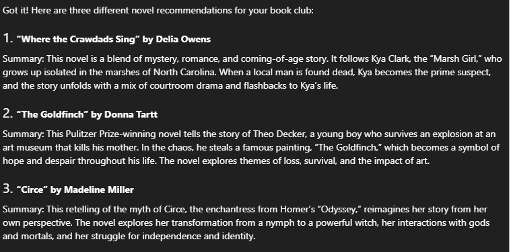
The standard prompt gets the job done, included a little summary for each recommendation. You could certainly take this to your book club.
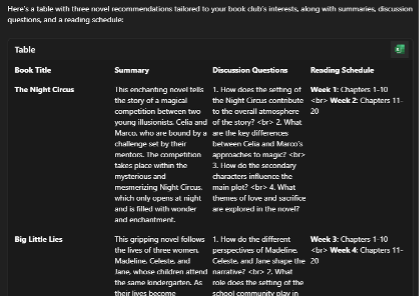
The enhanced prompt did in fact impress with a structured result and completed our initial task in the style we wanted it, incorporating our key details as well targeting our response. As you can see the results are much better after we A.S.K
Tips and Tricks
Some extra tips to further enhance your overall effectiveness of your prompt are:
- Be specific: The more specific your prompt, the better the results.
- Use clear language:
- Avoid using “thing, stuff, it”
Instead of the word Utilise replace with “use”, Leverage replaced with “take advantage of”, Optimise replaced with “improve” or “make better”
Avoid jargon:
- Jargon: “We need to leverage synergy.”
- Clear: “We need to work together effectively.”
By incorporating the A.S.K. method into your prompt-building process, you can significantly enhance the quality and relevance of the responses you receive from GenAI. Using this approach in part, or in its entirety, we found the AI on the other end is hungry to provide you with what you want, how you want it.
Remember to be specific and clear, though the key to getting better results is to always A.S.K.
Happy prompting!

Recognising and Preventing Phishing Attacks
/in Cyber SecurityPhishing attacks are a type of online scam that aims to trick people into revealing sensitive information, such as passwords, credit card numbers, or personal information. These attacks are becoming increasingly sophisticated, making it more difficult to spot them. It’s important to educate your business’s employees about the threat of phishing attacks and how to recognize them.
What is a phishing attack?
Phishing attacks are usually carried out via email, text messages, or social media platforms. The attackers often disguise themselves as legitimate companies or organizations and use tactics such as urgent messages, enticing offers, or fake login pages to trick people into providing sensitive information.
How to recognize a phishing attack
- Look for suspicious senders: Phishing emails often come from spoofed or fake email addresses that look similar to legitimate ones. Check the sender’s email address and look for any spelling mistakes or red flags.
- Check the content: Phishing emails often contain urgent or threatening messages, enticing offers, or requests for sensitive information. Be wary of any emails that require immediate action or request personal information.
- Hover over links: Before clicking on any links, hover over them to see where they lead. If the URL looks suspicious or unfamiliar, don’t click on it.
- Check the website: Phishing attacks often use fake login pages or websites that look like legitimate ones. Check the website address and look for any inconsistencies or spelling mistakes.
- Check for attachments: Phishing emails often contain malicious attachments, such as malware or viruses. Don’t open any attachments unless you are sure they are safe.
How to prevent phishing attacks
- Educate employees: Ensure that all employees are aware of the threat of phishing attacks and how to recognize them. Regularly provide training and reminders to keep everyone informed.
- Use anti-phishing tools: Consider using anti-phishing tools, such as email filters or web filters, to help identify and block phishing attempts.
- Secure your connections: Ensure that all connections to your business systems are secure, using encryption and secure protocols where possible. This can help prevent hackers from intercepting sensitive information.
- Use strong passwords and two-factor authentication: Encourage all employees to use strong, unique passwords for each of their accounts. Implement two-factor authentication to add an extra layer of security to their accounts.
- Keep software up to date: Ensure that all software and systems are up to date with the latest security patches and updates. This can help protect against known vulnerabilities.
Phishing attacks are a serious threat to all businesses, and it’s important to educate all employees about the dangers of phishing attacks and how to recognize them. By following these tips and implementing best practices, you can help protect your business from the devastating effects of phishing attacks.