
Microsoft Copilot: Free vs. Paid Licenses – Which One is Right for Your Business?
Artificial Intelligence is no longer a luxury—it’s a necessity for staying competitive and keep staff happy. Microsoft Copilot is leading this charge, but not all versions are created equal. Whether you’re using the free version or considering an upgrade to Copilot Pro or Microsoft 365 Copilot, understanding the differences can help you make an informed decision for your business.
Microsoft Copilot (Free)
What You Get:
- Basic AI-powered search & answers via Bing (with sources).
- Limited text generation (e.g., emails, summaries).
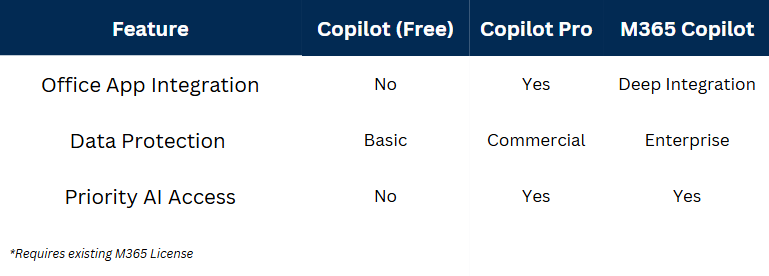
- No integration with Microsoft 365 apps (Word, Excel, Outlook).
- Standard response quality (slower, less refined).
Best For:
Casual users who need quick answers without deep workflow integration.
Limitations:
❌ No commercial data protection (do NOT use for sensitive info).
❌ No priority access during peak times (slower responses).
❌ Lacks advanced features like document analysis or Excel AI
Copilot Pro
What You Get:
- Priority access to GPT-4 Turbo (faster, higher-quality responses).
- AI in Office apps (Word, Excel, PowerPoint, Outlook) for summarising, drafting, and analysing.
- Enhanced image creation with DALL·E (100 boosts/day).
- Commercial data protection (enterprise-grade security).
Best For:
Professionals who need AI-powered productivity without full enterprise licensing.
Key Perks:
✅ Write with AI in Word (drafts, rewrites, tone adjustments).
✅ Excel formula generation & data analysis.
✅ Outlook email drafting & smart replies.
Microsoft 365 Copilot
What You Get:
- Full M365 app integration (Teams, OneNote, Loop, etc.).
- Advanced document understanding (summarise PDFs, extract insights).
- Business process automation (e.g., generate reports from data).
- Enterprise-grade security & compliance (private, encrypted AI).
Best For:
Businesses that want AI deeply embedded in workflows.
Why Upgrade?
- Teams meeting recaps & action item tracking.
- OneNote AI for meeting notes & task extraction.
- Private encrypted commercial data.
Basic Guide:
Individuals testing AI → Start with Copilot Pro.
Enterprises needing full workflow AI → M365 Copilot is a must.
Avoid the free version for business data—it lacks security.
Final Thoughts
Microsoft Copilot’s paid tiers unlock real productivity gains, while the free version is best for light use. If AI is part of your 2025 strategy, investing in Copilot Pro or M365 Copilot ensures security, speed, and seamless integration.